On 22 September 2026, the WordPress team released WordPress 7.1.2. It is an urgent security update that comes just five days after WordPress 7.1.1. It contains a single fix, but for a vulnerability that WordPress rates as critical.
The fix is already available and quick to apply. In this article we explain what happened and what you need to do next, without unnecessary technical detail.
In short
On 22 September 2026, WordPress 7.1.2 was released with a fix for a critical vulnerability that can be exploited without an account on the site and, under certain conditions, allows running someone else's code on the server. Every version from 4.7 to 7.1.1 is affected, including sites updated to 7.1.1 last week. We recommend updating your site to version 7.1.2 immediately. If you need help, the Jump.bg team is here for you.
What happened
When a visitor opens a page, WordPress picks which theme file to use to display it. It turned out that, using a specially crafted address, an attacker could trick WordPress into loading a file outside the theme folder that was never meant to be used this way.
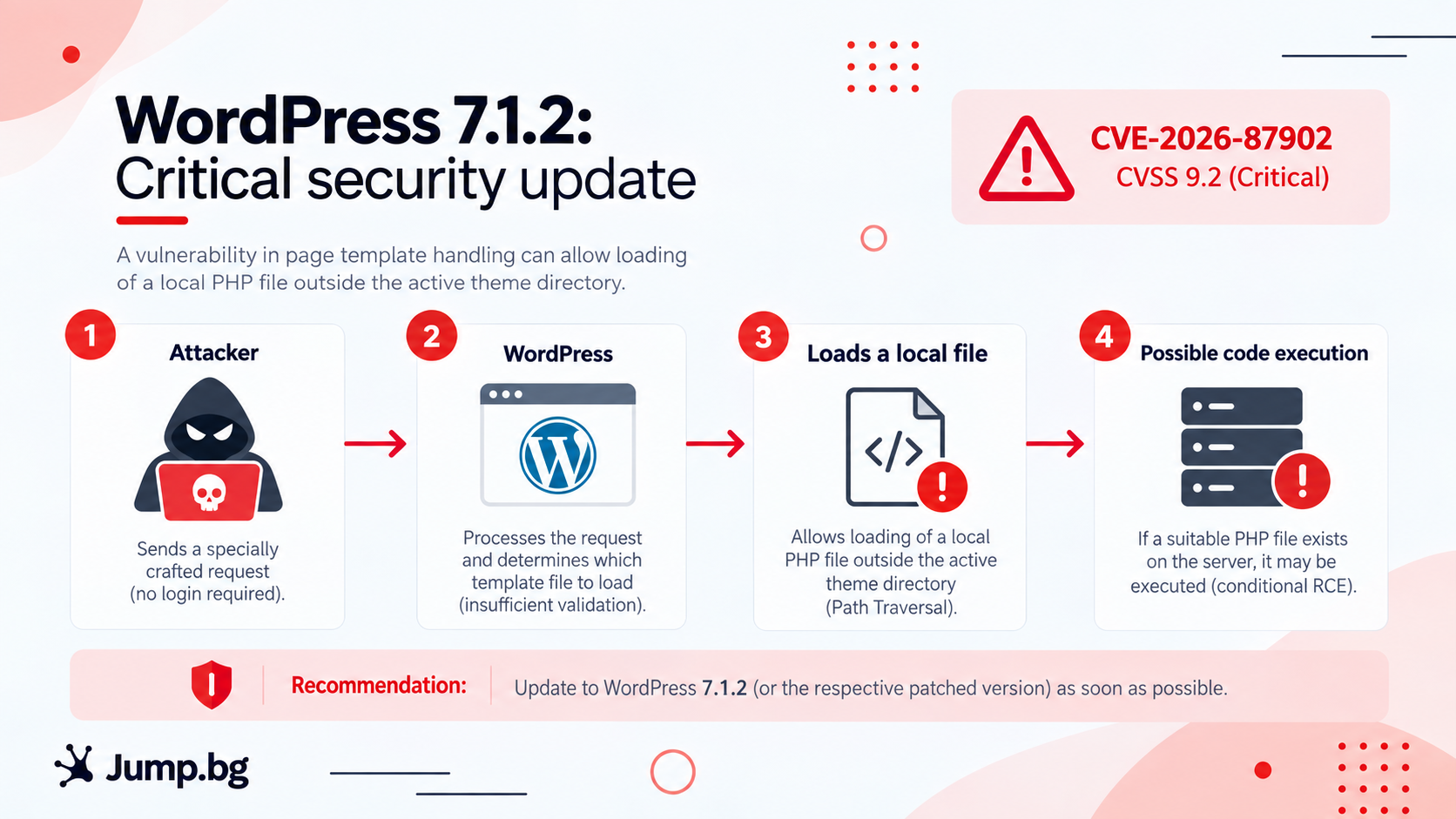
In the worst case, this lets the attacker run their own code on the server and effectively take control of the site. For that to happen, however, two conditions must be met at the same time:
| Condition | What it means | Who it affects |
|---|---|---|
| A certain type of theme | The active theme (or its parent theme) contains a folder whose name starts with "page-", for example "page-templates". | The older Twenty Twelve and Twenty Fourteen themes, as well as some popular themes such as Neve, Hestia and Sydney |
| Certain server settings | The server has a suitable PHP file and a PHP setting that allows it to be used in an attack. | Some common server configurations, especially with PHP versions before 8.5 |
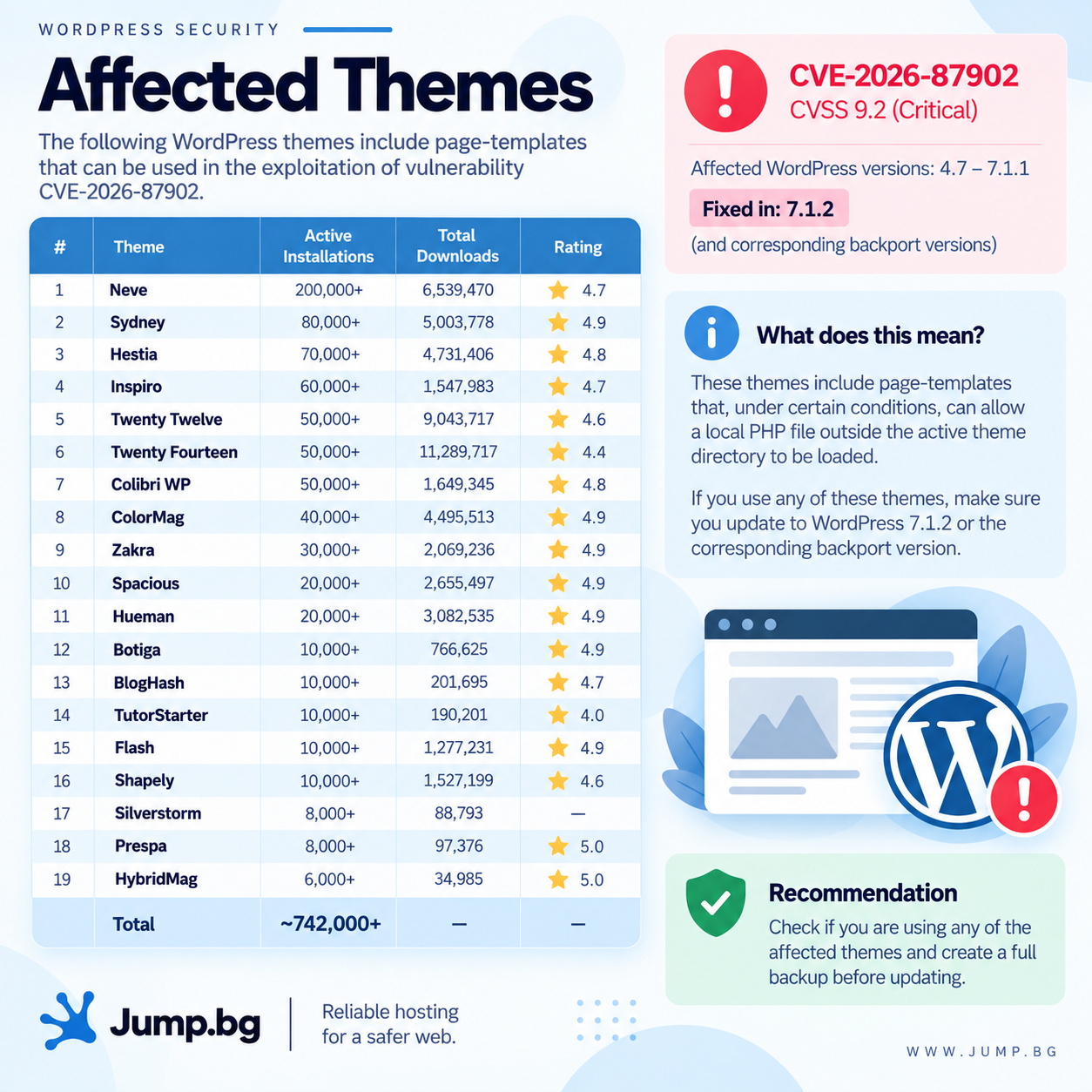
Even if your site does not meet these conditions, the vulnerability in WordPress itself is still there. Themes and settings change over time, so the only reliable solution is to update.
The issue was reported responsibly by security researcher Robert Ressl. It is tracked as CVE-2026-87902 and scores 9.2 out of 10 on the CVSS severity scale. Updating to 7.1.2 removes the risk completely.
Full details are available in the official WordPress announcement, the version 7.1.2 release notes and the security advisory on GitHub.
Is my site affected?
Once again, the range is very wide and covers versions released over almost ten years:
| WordPress version | Affected? | What to do |
|---|---|---|
| 7.1.2 | No | No action needed |
| 7.1 and 7.1.1 | Yes | Update to 7.1.2 |
| 7.0.x (including 7.0.5) | Yes | Update to 7.1.2 |
| 4.7 to 6.9.x | Yes | Update to 7.1.2 |
| 4.6 and older | Yes, and no longer receives fixes | Contact us about a migration |
Please note that updating to 7.1.1 last week is not enough. Version 7.1.1 is affected too.
If for some reason you cannot move to 7.1.2 right away, WordPress has also released fixes for older branches, such as 7.0.6, 6.9.9 and 6.8.10. This is a good temporary solution, but it does not replace updating to the current version.
By default, WordPress automatic updates stay within the same branch. That means a site on 7.1.1 will update itself to 7.1.2, while a site on 7.0.5 will update to 7.0.6, not to 7.1.2. If you want the latest version, update manually.
If you are not sure which version you are running, you can find it in the WordPress admin area, in the bottom right corner of the screen, or under Dashboard → Updates.
Why you should act now
This vulnerability is especially dangerous because it does not require an account on the site and can lead to full control over it. Now that the fix and the description of the issue are public, the information is available to attackers too, and sites that have not been updated can become targets of automated attacks. The good news is that updating takes only a few minutes and removes the risk completely.
What to do
Updating WordPress takes only a few minutes. Follow these simple steps:
- Back up your site. This is good practice before any update.
- Log in to your WordPress admin area.
- Go to Dashboard → Updates.
- If an update is available, click Update Now.
- Check that your version is now 7.1.2.
In many cases WordPress applies important security updates automatically, but it is worth checking manually so you can be sure your site is protected.
While you are in the admin area, take a few more minutes for two things:
- Appearance → Themes. Check whether you use one of the themes mentioned above (Twenty Twelve, Twenty Fourteen, Neve, Hestia, Sydney) or a theme based on them. If you do, updating is even more urgent. Also delete any themes you do not use.
- Theme and plugin updates. While you are on the Updates screen, update those too. Outdated themes and plugins are among the most common causes of hacked sites.
Need help?
If you are not sure which version you are running, have trouble updating, or simply want someone to check that everything is fine, the Jump.bg support team is here for you. Contact us and we will guide you step by step.
If you are still choosing where to host your site, take a look at our WordPress hosting plans. They are fast, secure and come with expert support, so you can focus on your business.
Your site's security matters to us. If you have any questions, get in touch with the Jump.bg team. We are here to help.