A domain name is more than just a web address. It represents ownership, access to services, and often the public identity of a business or project. If control over it is lost, the impact can be immediate, ranging from website downtime to email disruption to a full takeover by an unauthorized party.
One of the most common ways this happens is through unauthorized transfers, where a domain is moved to another registrar without the owner’s approval. This is where domain locking plays a critical role. It acts as a safeguard, restricting changes and preventing transfers unless specific conditions are met.
This article will discuss the purpose of a domain lock, how it works, and why it is essential for preventing unauthorized domain transfer and hijacking.
Key Takeaways:
A domain lock is a security feature that prevents unauthorized domain transfers and critical changes by restricting actions at the registrar or registry level. It reduces the risk of domain hijacking by ensuring that transfer requests and ownership modifications cannot proceed without explicit authorization. For effective protection, domain locking should be used alongside strong account security measures such as two-factor authentication and regular monitoring.
Understanding the Purpose of a Domain Lock
A domain lock exists to enforce control at the registrar level before any critical changes to a domain can be processed. It is not just a general safety feature but a specific restriction on high-risk actions, such as transfers or administrative updates.
In practice, this means certain requests are automatically rejected unless the account holder intentionally changes the domain status. This creates a deliberate checkpoint in the management process, ensuring that sensitive actions cannot proceed through automated systems or via unauthorized access alone.
The purpose of this mechanism is to separate routine management from high-impact changes that affect ownership or control. By doing so, it reduces the chance of accidental modifications and limits the effectiveness of compromised credentials when targeting domain accounts.
Key Features and Functionalities of Domain Locks
Registry-Level Enforcement
Domain locking is enforced at the registry level through standardized status codes such as clientTransferProhibited. When this status is active, transfer requests are automatically rejected before processing, ensuring the restriction is applied consistently across systems.
Scope of Restrictions
The lock primarily prevents high-impact actions, such as transfers. Depending on the registrar, it may also limit updates to critical settings, including registrant information and nameservers. These controls are designed to restrict changes that could alter ownership or redirect domain traffic.
Registrar-Level Management
Most registrars provide direct controls to enable or disable domain locks in their account dashboards. Access is typically protected by authentication steps, ensuring that changes are intentional and verified before they take effect. This allows users to manage restrictions without needing technical access to registry systems.
Types of Domain Lock
Registrar Lock
A registrar lock is the standard type of domain protection managed through the provider’s dashboard. It restricts transfers and certain critical changes unless the owner manually disables the lock after authentication. This makes it suitable for everyday use, offering a balance between security and easy account-level management, but its effectiveness still relies heavily on the registrar account's security.
Registry Lock
A registry lock operates at the registry level, adding stricter controls that go beyond the registrar’s system. Any attempt to modify or transfer requires additional verification steps, often involving manual approval and identity checks before changes are processed. This makes unauthorized changes significantly harder to execute, even if account credentials are compromised, which is why it is typically used for high-value or high-risk domains.
How to Identify the Lock Status of Your Domain
The lock status of a domain can usually be confirmed directly through the registrar’s control panel. Most providers display this setting under domain management, typically labeled as “Domain Lock” or “Transfer Lock,” indicating whether restrictions are currently active.
It can also be verified using a WHOIS lookup, which shows publicly available domain information. In the results, status indicators such as clientTransferProhibited suggest that it is locked and transfer actions are restricted at the registry level.
Checking both the registrar dashboard and WHOIS data provides a reliable way to confirm that protection measures are properly in place and the domain is not exposed to unauthorized changes.
How to Lock or Unlock a Domain at Jump.bg
At Jump.bg, we treat domain locking as a core part of protecting your online presence. Since domains can be moved or modified through account access, we make it easy to lock or unlock them instantly from your dashboard, so you can respond quickly to security concerns or legitimate changes in just a few steps.
Step 1: Log in to your Jump.bg account
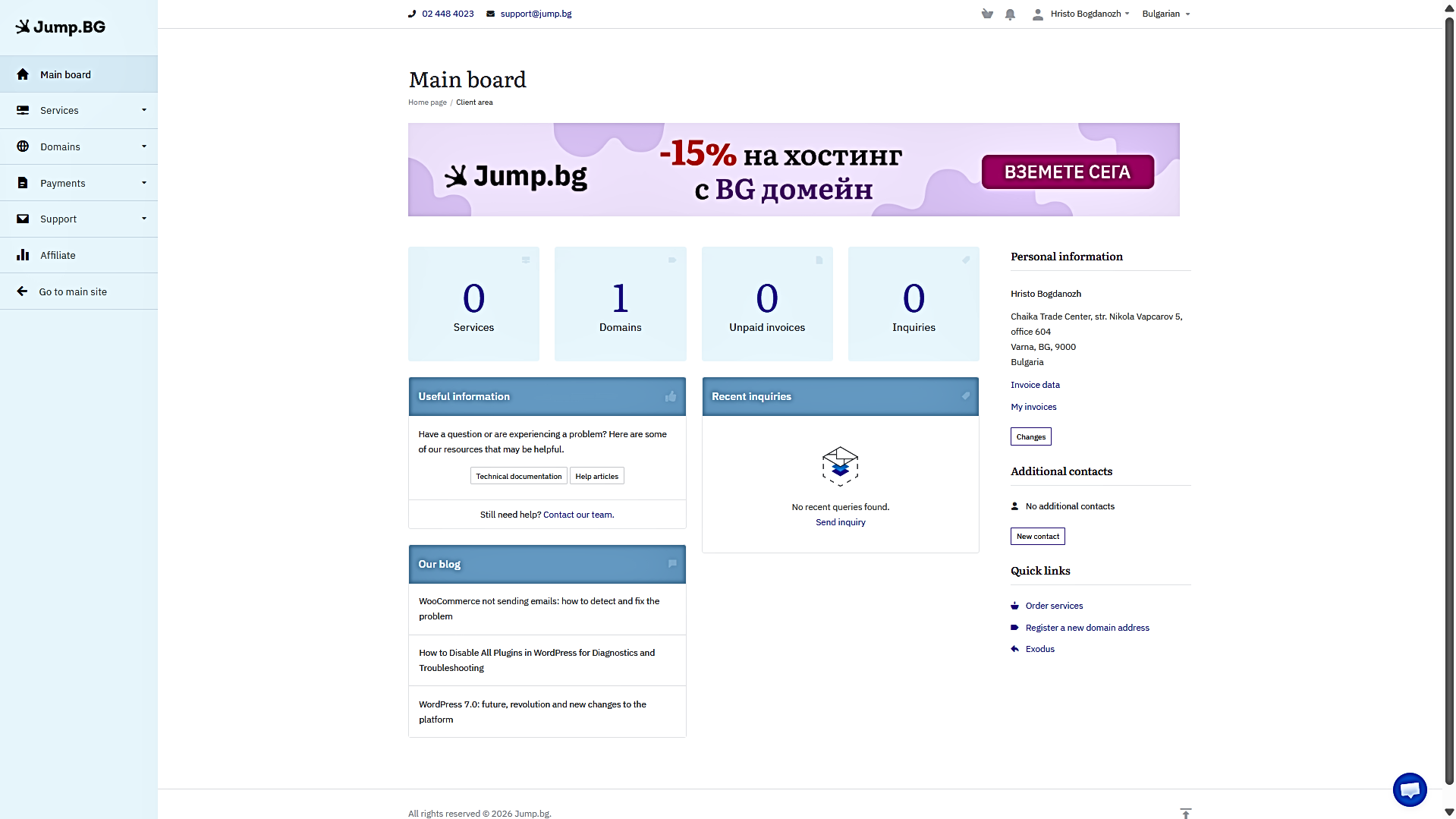
Access your Jump.bg client area using your account credentials.
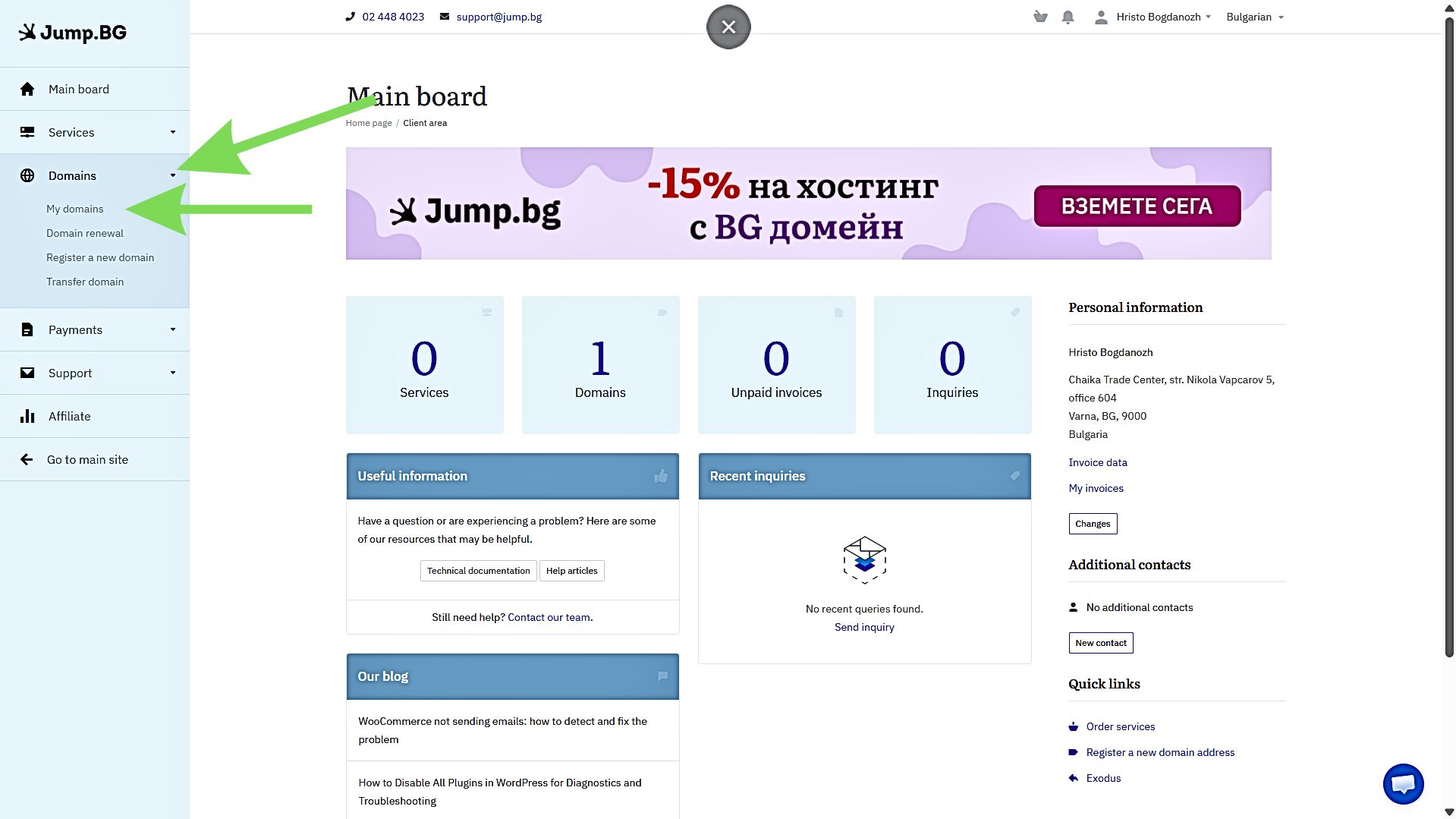
Step 2: Navigate to Domains
From the left-hand menu, click on Domains, then open the dropdown and select My Domains.
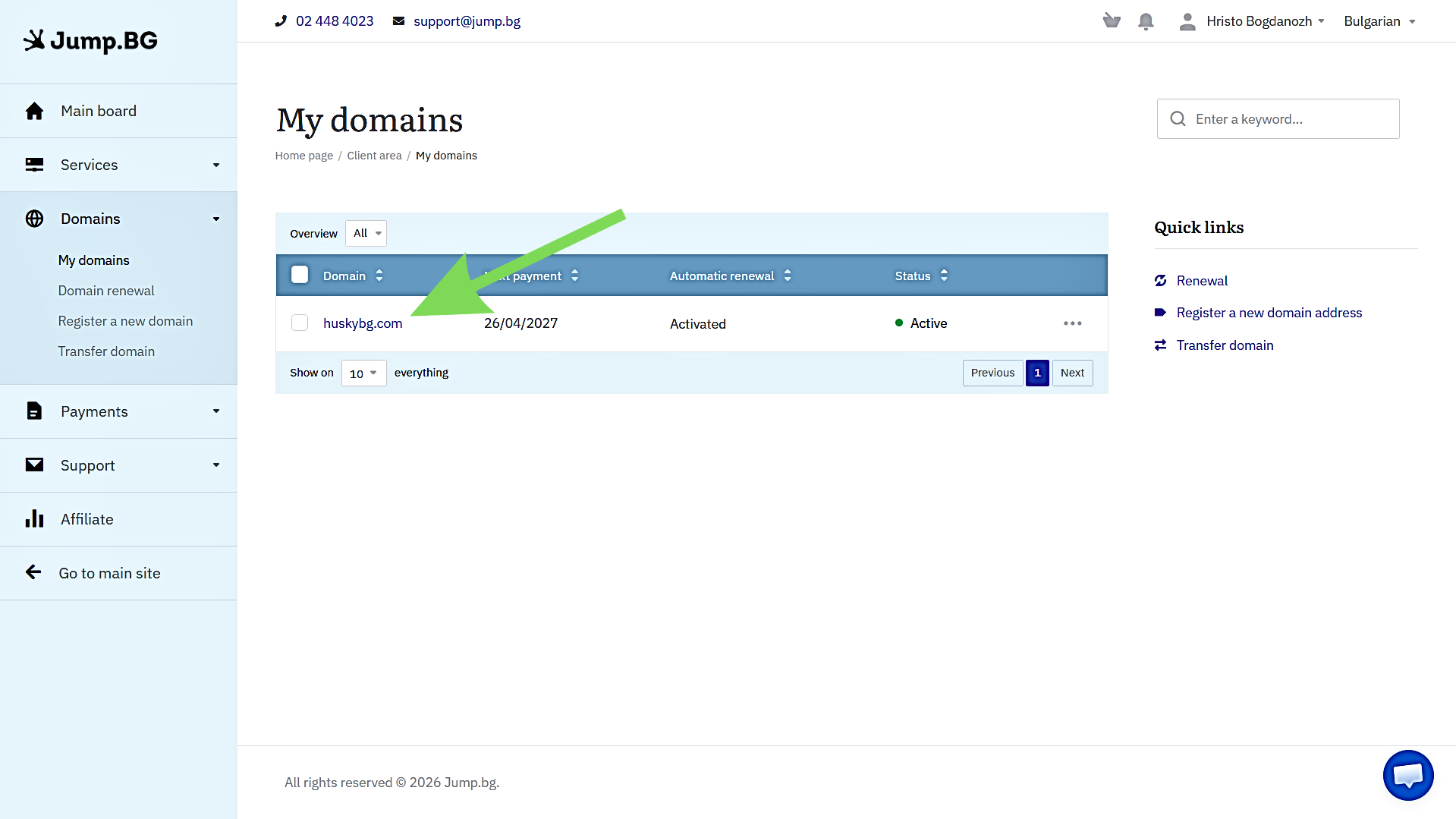
Step 3: Select the domain you want to manage
Click on the specific domain name. This will take you to the domain management page.
Step 4: Locate the domain lock setting
Look for the Domain Lock or Transfer Lock option.
It is usually located in the management panel on the right side or in an additional section near the bottom of the page.
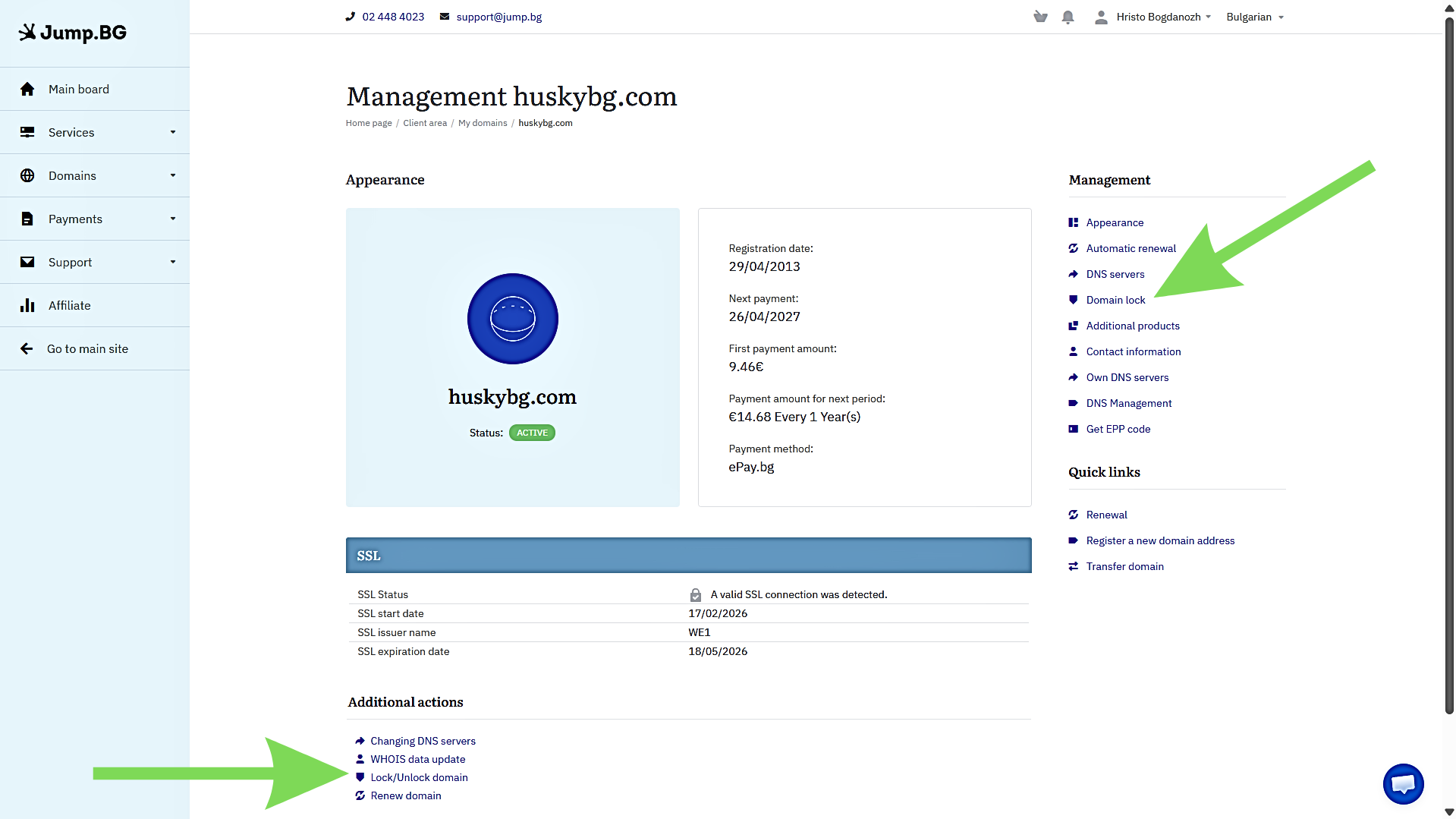
Step 5: Enable or disable the lock
Use the available button or toggle to:
- Enable / Activate the lock to secure the domain
- Disable / Deactivate the lock if you need to perform changes or start a transfer
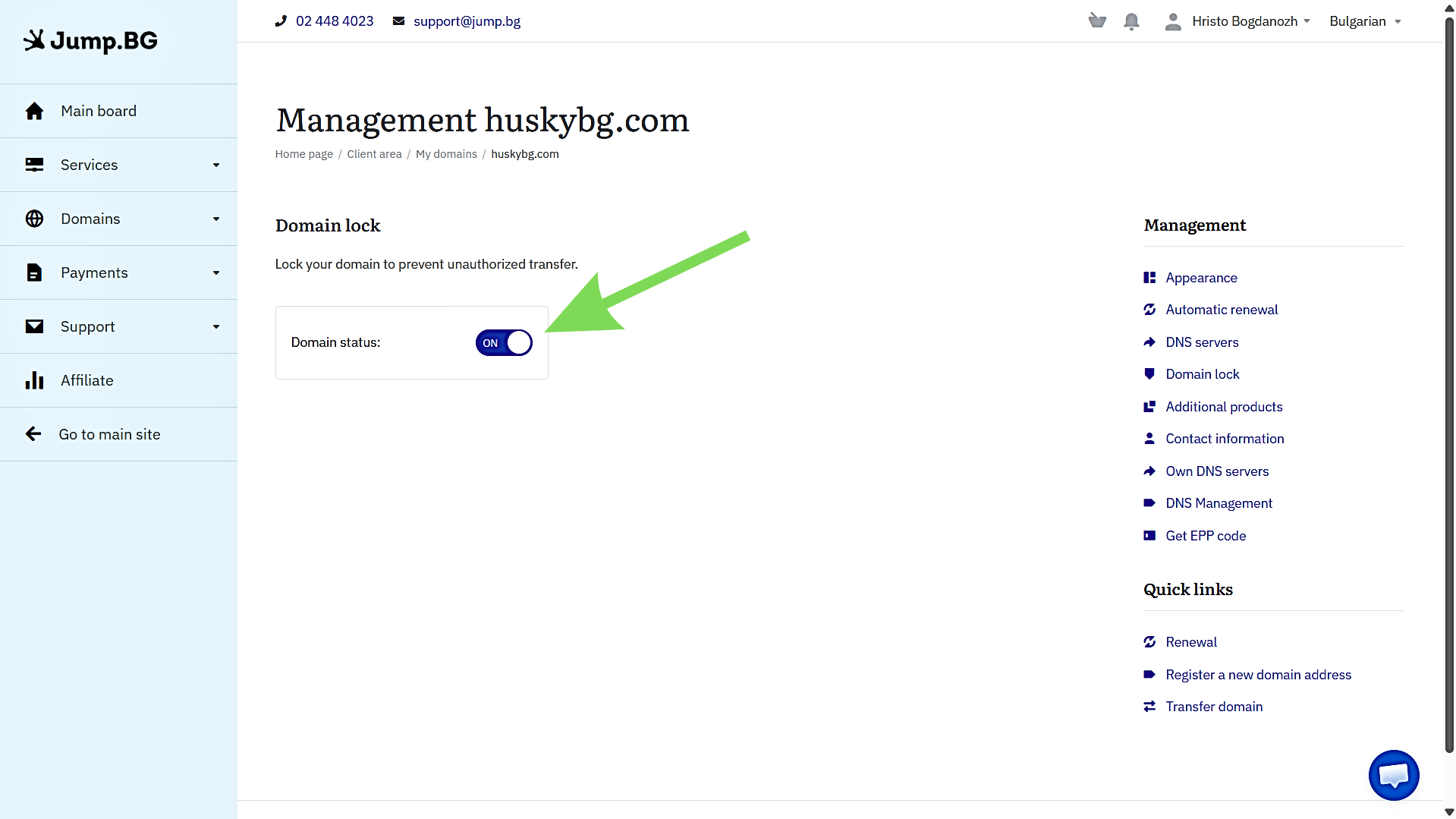
Confirm the change
Make sure the update is applied and that the domain status reflects your action before leaving the page.
Risks of Not Using a Domain Lock
Without domain locking enabled, a domain is more vulnerable to unauthorized changes once account access is compromised. In many cases, attackers do not need to target the website itself; they only need access to the registrar account to initiate a transfer or modify ownership details.
If a transfer is completed without the owner’s approval, control can be lost quickly, along with all services tied to it, such as websites and email. Recovery is often difficult because it may have already been moved to another provider, leaving little time to reverse the action.
There is also the risk that the domain is used for malicious purposes after takeover, including impersonation or fraud. At that point, the original owner is not only dealing with loss of access but also potential reputational and operational consequences.
Best Practices for Ensuring Domain Security
Domain locking is an important safeguard, but it works best when combined with other basic security practices that protect access to your registrar account and settings.
- Use strong, unique passwords for your registrar account: Avoid reused or predictable passwords, since account access is the most common entry point for unauthorized domain changes.
- Enable two-factor authentication (2FA): It adds an extra verification step that significantly reduces the risk of account compromise, even if login credentials are exposed.
- Monitor domain activity regularly: Periodically checking your account helps you detect unexpected changes early, especially modifications to DNS, contact details, or transfer settings.
- Keep domain contact information up to date: Accurate contact details ensure you receive critical notifications, including renewal alerts and security warnings.
- Review security settings periodically: Regularly checking your registrar security options helps ensure that protections like domain lock and authentication methods remain properly configured.
Conclusion
Domain lock remains one of the most effective and straightforward ways to protect a domain from unauthorized transfers and unwanted changes. It acts as a control layer that helps ensure ownership remains secure unless changes are intentionally made by the account holder.
When combined with basic account security practices and regular monitoring, it becomes part of a more reliable overall protection strategy for any domain.
At Jump.bg, domain security features such as domain locking are included in the standard domain management experience, giving users direct control over how their domains are protected in their account.
If you are looking for a provider that includes built-in security controls and easy domain management, you can explore our domain registration options at Jump.bg. For support or inquiries, you can reach our team at 02 448 4023, email sales@jump.bg, or use our contact page.